Screenshots




App details
- Size
- 16.20 MB
- Updated
- August 21, 2009
- Requires
- Windows 95
- Language
- English
- License
- Free
- Developer
- Sharrine Ishak
- Category
- Windows OS
SoftPas in:
This product is also available in the following languages:
About Luminous Wallpapers
Download Luminous Wallpapers – Free High‑Quality Desktop Backgrounds
Overview
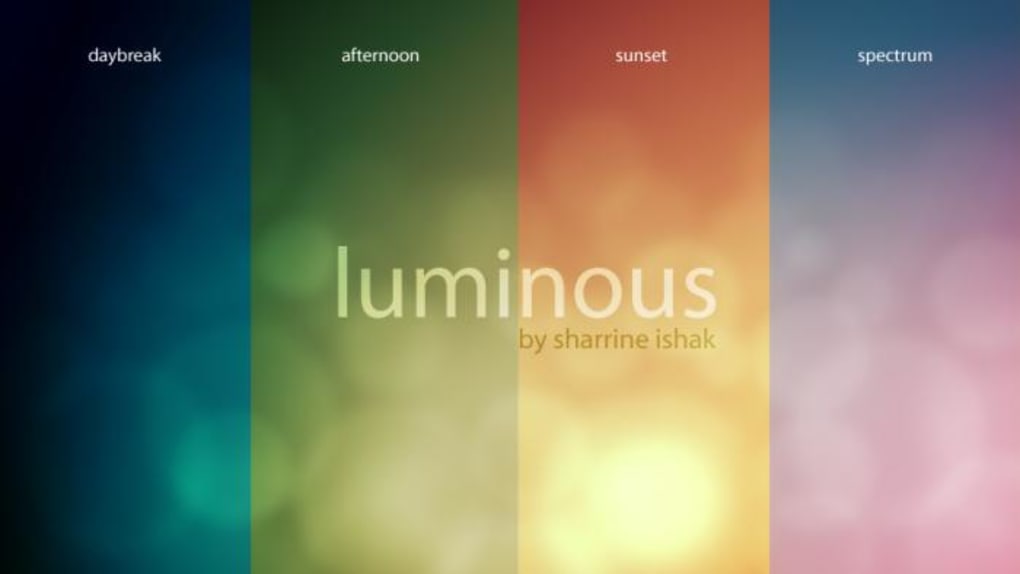
Luminous Wallpapers is a thoughtfully curated collection of four ambient desktop backgrounds that mirror the natural colour shifts of a day—from the soft pastel glow of dawn to the deep, calming hues of night. Each of the four “time‑of‑day” themes comes with ten resolution‑specific versions, ranging from a modest 800 × 600 px up to an ultra‑wide 2560 × 1600 px, ensuring a perfect fit for virtually any monitor size or aspect ratio. The images are rendered in extreme high quality, delivering crisp details and vibrant colour accuracy that make even the most basic screen look like a professional‑grade display.
While the concept of “time‑of‑day” wallpapers might feel a bit prescriptive, the visual appeal of Luminous Wallpapers stands on its own. The warm, relaxing tones are designed to reduce eye strain during long working sessions, and the seamless transitions between morning, afternoon, evening, and night can subtly reinforce a healthy daily rhythm. Whether you’re a creative professional who needs an inspiring backdrop, a gamer looking for a subtle yet striking desktop, or simply someone who enjoys a touch of elegance on their screen, this pack offers a versatile solution that is both free and easy to implement.
The distribution format is a single ZIP archive. After downloading, you simply extract the file to reveal four clearly labeled folders—each representing a different part of the day. Inside each folder you’ll find ten files, each named according to its resolution (e.g., “Luminous_Morning_1920x1080.jpg”). This organization makes it effortless to locate the exact size you need without hunting through endless files. Because the wallpapers are standard JPEG images, they are compatible with all major operating systems and desktop environments, from Windows and macOS to Linux distributions. No additional software or licensing fees are required; just download, unzip, and set your favorite image as the background.
Features & Installation Guide
- Four distinct themes reflecting sunrise, midday, sunset, and night.
- Ten resolution options per theme (800 × 600 px to 2560 × 1600 px).
- Ultra‑high‑definition JPEG format for crystal‑clear detail.
- Free and fully licensed for personal and commercial use.
- Simple ZIP distribution—no installer required.
- Optimised colour palette to reduce eye fatigue.
- Compatible with Windows, macOS, Linux, Android and iOS (as lock‑screen images).
- Lightweight file size (each image under 2 MB) for quick downloads.
Step‑by‑Step Installation
1. Download the ZIP file from the official download page. The file size is under 20 MB, making it quick to retrieve even on slower connections.
2. Locate the file in your Downloads folder and right‑click to select “Extract All” (Windows) or double‑click to expand (macOS). This will create a folder named “Luminous_Wallpapers”.
3. Open the folder. Inside you’ll see four sub‑folders: Morning, Afternoon, Evening, and Night. Choose the theme that best matches your current lighting environment or personal preference.
4. Select a resolution. Each sub‑folder contains files named with their exact dimensions. For a standard 1920 × 1080 display, pick the file ending in “1920x1080”. If you have a 4K monitor, choose the 3840 × 2160 version (if available) or the highest resolution you have.
5. Set as wallpaper:
- Windows 10/11: Right‑click the image → “Set as desktop background”.
- macOS: Open System Settings → Desktop & Screen Saver → Drag the image into the preview area.
- Linux (GNOME/KDE): Right‑click the desktop → “Change Background” → Select the image.
- Android/iOS: Transfer the image to your device via USB or cloud storage, then set it as lock‑screen or home‑screen wallpaper through the device’s settings.
The entire process takes less than five minutes, and because no additional software is installed, there’s zero risk of unwanted bloatware or security concerns. If you ever wish to change the wallpaper, simply repeat the steps with a different resolution or theme.
Compatibility, Pros & Cons
Luminous Wallpapers are pure image files, which means they are universally compatible across all major platforms. Below is a quick compatibility matrix:
- Windows: Windows 7, 8, 10, 11 – native JPEG support.
- macOS: macOS 10.12 (Sierra) and later – works with System Settings.
- Linux: Any distribution with a standard desktop environment (GNOME, KDE, XFCE, etc.).
- Android: 5.0 (Lollipop) and later – set as lock‑screen or home‑screen.
- iOS: iOS 12 and later – can be used for lock‑screen images.
Pros
- High visual quality: Rendered at high DPI, each image looks crisp on both low‑resolution laptops and 4K monitors.
- Free and unrestricted: No hidden fees, no subscription, and the license permits personal and commercial use.
- Time‑of‑day themes: The curated colour shifts can help reinforce a natural daily rhythm and reduce screen‑time fatigue.
- Easy to install: No installer, no registry edits – just unzip and set.
- Lightweight files: Small JPEG sizes keep download times short and conserve disk space.
Cons
- Limited to four themes: Users seeking more granular lighting changes (e.g., dawn vs. sunrise) may find the selection minimal.
- No dynamic switching: The pack does not include an automatic scheduler; you must manually change the wallpaper as the day progresses.
- Resolution gaps: While the range is broad, ultra‑wide monitors above 2560 × 1600 may need scaling or cropping.
- Static images only: No animated or live‑wallpaper options for those who prefer motion graphics.
FAQ & Conclusion
-
Can I use Luminous Wallpapers for commercial projects?
Yes. The wallpapers are released under a free‑use license that permits both personal and commercial usage without attribution.
-
Do the wallpapers support 4K and ultra‑wide monitors?
The highest resolution offered is 2560 × 1600 px. For true 4K displays, the image will be scaled, which still looks sharp thanks to the high‑quality source, but a dedicated 4K version is not currently included.
-
Is there an automatic way to switch wallpapers based on the time of day?
Luminous Wallpapers are static files only. However, you can pair them with third‑party scheduler tools (e.g., Windows Task Scheduler or macOS Automator) to change the background automatically.
-
Can I edit the images before using them?
Absolutely. Since they are standard JPEGs, any image editor (Photoshop, GIMP, Paint.NET) can modify them. Feel free to crop, adjust brightness, or add overlays.
-
How do I report a problem or request a new resolution size?
You can contact the developer through the official support email provided on the download page. They welcome feedback and often add new resolutions based on community requests.
Conclusion – Should You Download Luminous Wallpapers?
If you value a clean, high‑resolution aesthetic and appreciate the subtle psychological boost of colour‑coded day phases, Luminous Wallpapers is a solid free choice. The package delivers professional‑grade visuals without hidden costs, and the straightforward installation process means you’ll be up and running in minutes. While it lacks dynamic switching and ultra‑wide resolutions, the pros—exceptional image quality, broad OS compatibility, and a license that permits commercial use—outweigh the minor limitations. For anyone looking to refresh their desktop with a calm, elegant backdrop, we recommend downloading Luminous Wallpapers today. Simply click the download button below, unzip, pick the perfect resolution, and let your screen shine with a touch of daylight.
Guides & Tutorials
How to install Luminous Wallpapers
- Click the Download button above.
- Once redirected, accept the terms and click Install.
- Wait for the Luminous Wallpapers download to finish on your device.
How to use Luminous Wallpapers
This software is primarily used for its core features described above. Open the app after installation to explore its capabilities.
User Reviews
No reviews yet. Be the first to share your experience.
You may also like
more
Llama 2
Free-to-use large language model As the new addition to Meta’s arsenal of langua...

NotebookLM
Revolutionizing the note-taking and idea-generation process NotebookLM is an exp...

Github co pilot
AI-inspired software development and coding platform GitHub Copilot is a browser...

Google Gemma
Google’s lightweight AI models Introducing Google Gemma , a family of cutting-ed...

AI Image Enlarger
A free app for Windows, by ai-image-larger. AI Image Enlarger is a free software...

DALL E
AI-driven text-to-image transformation engine DALL·E is a free graphic and desig...